

How to Connect | Setup Guide | Openterface Mini-KVM
Quick Setup
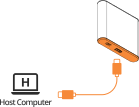
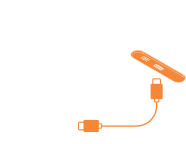
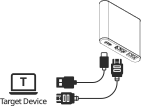

Setup in 4 simple steps:
- Host Connection (Orange side): Connect host computer using 1.5m Type-C cable
- Target Connection (Black side): Connect target device using 0.3m Type-C cable
- Video Connection (Black side): Connect target's video output to HDMI port
- USB Device (Optional): Connect to USB-A port after completing steps 1-3
Port Guide
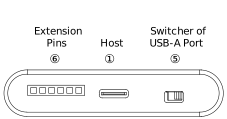
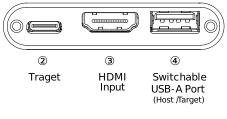


- ① Host USB-C: Data transfer to host computer
- ② Target USB-C: Keyboard/mouse control output
- ③ HDMI Input: Video input from target device
- ④ USB-A Port: Switchable between host/target
⑤ 
 Toggle Switch: Switch USB-A port between host/target
⑥ 
 Extension Pins: Developer access (see Extension Pins)